
How to Use Screaming Frog to Improve On Page SEO
Screaming Frog SEO Spider crawls a website and surfaces the on-page elements that matter for optimization: page titles, meta descriptions, headings, content, indexability, canonicals, internal links, and more, all organized into reviewable tabs and reports.
The tool identifies issues and provides the data; the actual improvements come from an SEO professional reviewing that data, deciding what genuinely needs fixing, and making the change.
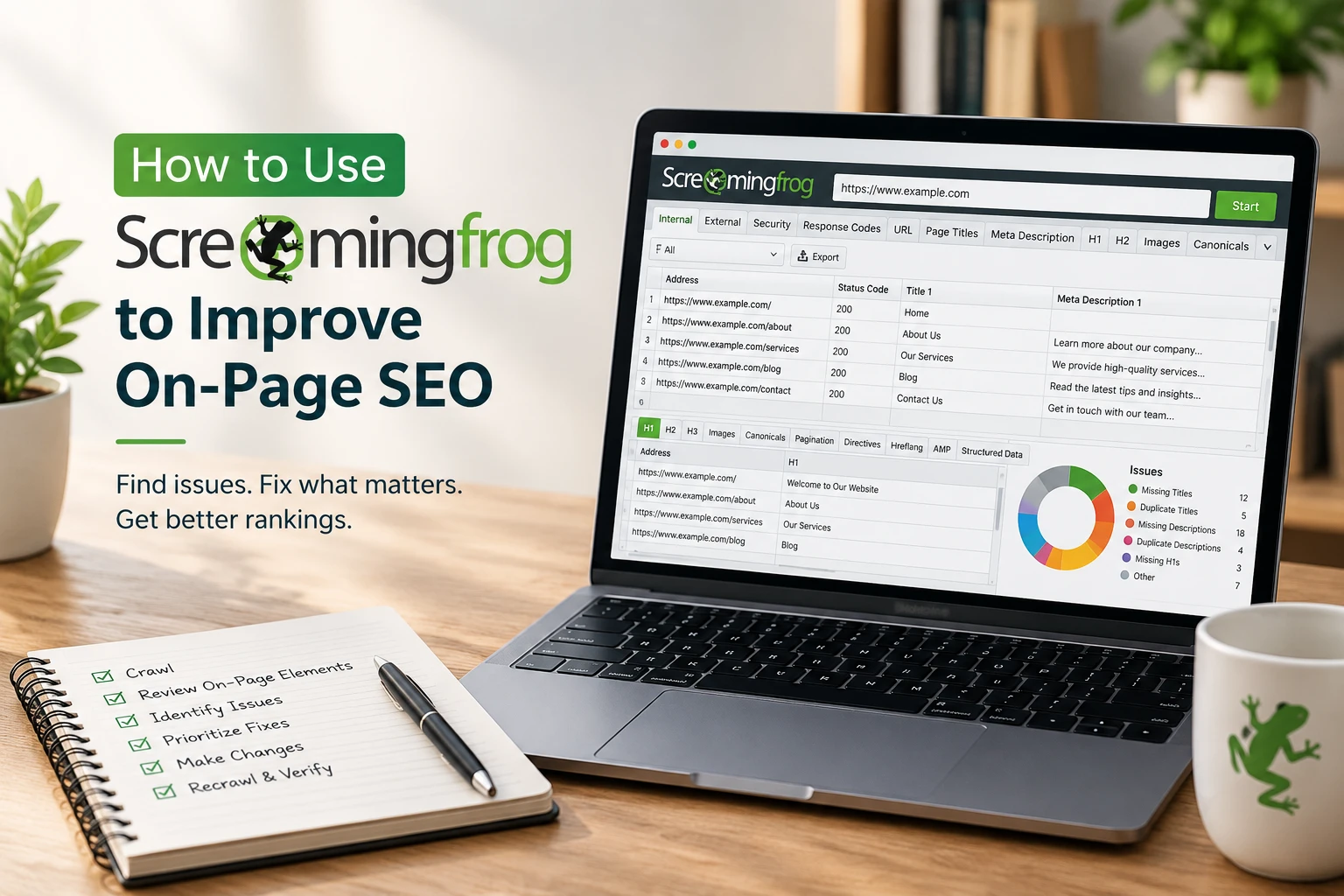
The basic workflow looks like this: crawl the site, review the on-page elements it surfaces, identify genuine issues, prioritize fixes, make changes, then recrawl to verify. The rest of this guide walks through that process step by step.
What Is Screaming Frog SEO Spider?
Screaming Frog SEO Spider is a desktop crawler that follows a website’s links the way a search engine crawler does, collecting data from every URL it finds along the way. You give it a starting URL, and it requests each page, parses the HTML, and records details like status codes, title tags, meta descriptions, headings, images, links, and canonical tags, presenting all of it across different tabs and reports you can filter, sort, and export.
How Does Screaming Frog Help With On-Page SEO?
Screaming Frog can analyze page titles, meta descriptions, H1 and H2 headings, content, URLs, indexability, canonicals, internal links, images, and other crawlable elements across an entire site at once.
This is primarily an auditing and analysis tool: it surfaces what’s there and flags patterns worth reviewing, but the SEO professional still has to decide which findings actually matter and what the right fix is for a given page.
How to Use Screaming Frog for an On-Page SEO Audit
1. Crawl the Website
Enter the starting URL in the address bar and click start. Screaming Frog begins requesting pages and populating its tabs in real time.
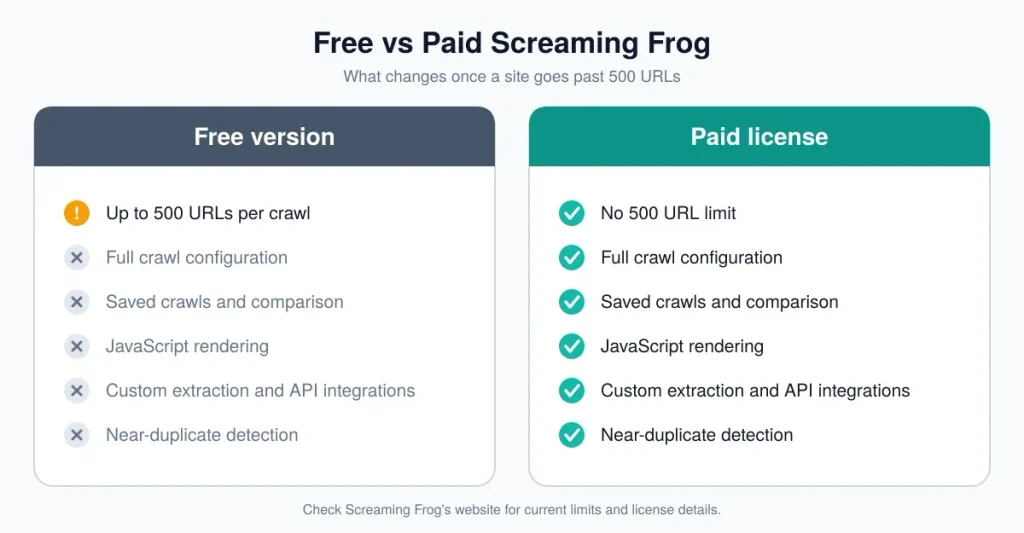
Worth knowing before you start: the free version crawls up to 500 URLs per crawl, and it restricts crawl configuration, saving crawls, and several advanced features, including JavaScript rendering, custom extraction, and API integrations.
A paid license removes the 500-URL limit and unlocks full access to crawl configuration, JavaScript rendering, saved crawls, and the other advanced features referenced throughout this guide.
If a site relies heavily on JavaScript to render content, headings, or links, JavaScript rendering (available with a paid license, under Configuration > Spider > Rendering) is what lets Screaming Frog see that content the way a browser would; without it, a JavaScript-heavy page can come back looking close to empty.
2. Review Page Titles
The Page Titles tab surfaces missing titles, duplicate titles across multiple pages, pages with multiple title elements, and titles that are unusually short or long relative to typical display limits. A missing title on an important page is usually worth fixing quickly, since the title is often the first thing both users and search engines see for that page.
A duplicate title across several pages suggests those pages either need to be differentiated or, if they genuinely serve the same purpose, consolidated.
Length-based filters in Screaming Frog reflect practical display limits in search results, not an official Google character rule; Google doesn’t publish a fixed limit, and truncation is based on pixel width rather than character count. Prioritize title fixes by relevance, uniqueness, how well the title reflects search intent, and the purpose of the page rather than by chasing an exact character count.
3. Audit Meta Descriptions
The Meta Description tab identifies missing descriptions, duplicates, multiple descriptions on one page, and descriptions that are unusually short or long. Meta descriptions aren’t a direct Google ranking factor, but they can influence how a result is presented in search and help users judge whether a page answers their question before they click.
Writing or improving a meta description doesn’t guarantee a higher click-through rate; it’s one factor among several that shape how a listing performs, and Google sometimes rewrites the displayed snippet regardless of what’s in the tag.
4. Check H1 and H2 Headings
The H1 and H2 tabs reveal missing H1s, multiple H1s on a single page, duplicate H1s across pages, and heading length issues where relevant. Headings help organize page content and communicate its structure to both readers and search engines.
A page with more than one H1 isn’t automatically an SEO problem; HTML5 permits multiple H1s in certain structures, and whether it needs attention depends on whether the page’s heading structure is genuinely confusing.
5. Review Content and Word Count
Screaming Frog’s Content tab can surface word count, readability indicators, duplicate and near-duplicate content, spelling and grammar issues where supported, and low-content pages. A specific word count isn’t a universal requirement for every page.
Content should be sufficient to satisfy the page’s purpose and the search intent behind it, a short, direct answer page doesn’t need padding, while a comparison guide covering several distinct questions typically needs more depth. Treat a low word count flag as a prompt to review the page’s purpose, not an automatic signal that the page needs more text.
6. Find Duplicate and Near-Duplicate Content
Screaming Frog can detect exact duplicate pages using an algorithmic check. Near-duplicate and semantically similar content detection, which flags pages that are substantially similar but not identical, is one of the advanced features available with a paid license;
it needs to be enabled before the crawl (under Configuration > Content > Duplicates) and, for the full picture, run through crawl analysis afterward.
This kind of check often points to overlapping blog posts, near-identical articles, or product and category page variations that compete against each other for the same search intent. The right fix depends on why the duplication exists: genuinely different pages that happen to read similarly may just need clearer differentiation, while pages serving the same purpose might be better consolidated into one stronger page.
7. Review URL Structure
The URL-related filters can flag very long URLs, uppercase characters, underscores, parameters, non-ASCII characters, and repetitive path segments. Not every flagged URL needs changing. URL changes make sense when there’s a genuine usability, crawlability, duplication, or structural reason behind them, not simply because Screaming Frog highlighted a pattern.
Changing a URL that’s already indexed and ranking carries its own risk (broken links, lost equity) that should be weighed against the actual benefit of the change.
8. Check Indexability and Directives
The Internal tab’s Indexability and Indexability Status columns, along with directive data pulled from meta robots and X-Robots-Tag headers, show which URLs are indexable and which are excluded, and why: noindex, blocked by robots.txt, canonicalized elsewhere, or a non-200 status code. A non-indexable page isn’t automatically an error.
Some pages, internal search results, thank-you pages, staging content, are intentionally excluded from search, so the useful question is whether an important page is unexpectedly non-indexable, not whether any non-indexable pages exist at all.
9. Audit Canonicals
The Canonicals tab shows each page’s stated canonical URL and flags situations worth reviewing: canonical chains, canonicals pointing to unexpected destinations, or canonicalized URLs that may need a second look. Canonical decisions should reflect the site’s actual intended preferred URL for each piece of content and the real relationships between similar pages, not a blanket rule.
Adding a self-referencing canonical to every single page isn’t automatically necessary; whether that’s useful depends on the site’s broader canonicalization strategy and whether duplicate-URL issues exist in the first place.
10. Improve Internal Linking
Internal link data, including inlinks, outlinks, crawl depth, and anchor text, helps identify pages receiving few internal links, important pages that are hard to reach through normal navigation, and opportunities to connect related content more clearly. Internal linking should help both users and search engines discover and understand which pages matter most on a site.
Adding more internal links doesn’t automatically increase rankings; it’s a structural improvement that supports discoverability and can help search engines understand a page’s relative importance, among other factors that influence how it performs.
11. Check Image Alt Text
Screaming Frog’s Images tab identifies images missing alt text or missing the alt attribute entirely. Descriptive alt text is genuinely useful for meaningful images, images that convey actual content or function, since it supports accessibility and gives search engines context.
Purely decorative images generally don’t need descriptive alt text. Either way, alt text should describe what the image actually shows rather than being stuffed with target keywords.
12. Prioritize the Issues You Find
A full crawl of a mid-sized or larger site can surface hundreds of flagged items, and not every one deserves equal attention. Worth weighing when prioritizing: the business importance of the affected page, its existing search visibility and organic traffic, whether it’s indexable, how well it matches search intent, how many URLs are affected, how severe the issue actually is, how easy the fix is, and the likely impact on users. The goal of an audit is an actionable, prioritized list, not a spreadsheet of hundreds of unreviewed warnings.
13. Make the Changes and Re-Crawl
The workflow from here is: find the issue, investigate why it exists, fix it, recrawl, and verify. Screaming Frog’s crawl comparison feature, another paid-license capability, can help here, letting you compare a new crawl against a saved previous one to confirm that specific issues were actually resolved rather than assuming a change worked.
What On-Page SEO Issues Can Screaming Frog Find?
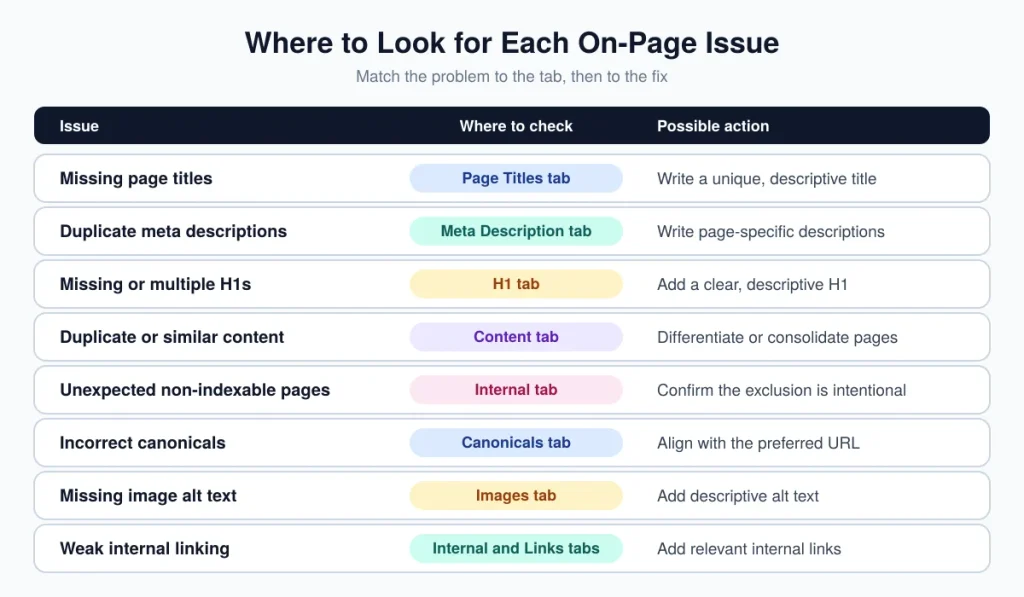
| Issue | Where to Check | What to Look For | Possible Action |
| Missing page titles | Page Titles tab | Pages with no title element | Write a unique, descriptive title |
| Duplicate page titles | Page Titles tab | Same title across multiple pages | Differentiate or consolidate pages |
| Missing meta descriptions | Meta Description tab | Pages with no description | Write a description reflecting the page’s content |
| Duplicate meta descriptions | Meta Description tab | Same description across pages | Write unique, page-specific descriptions |
| Missing H1s | H1 tab | Pages with no H1 element | Add a clear, descriptive H1 |
| Duplicate H1s | H1 tab | Same H1 on multiple pages | Review whether pages should be differentiated |
| Duplicate or near-duplicate content | Content tab | Pages with highly similar text | Differentiate content or consolidate pages |
| Non-indexable pages | Internal tab | Unexpected noindex or blocked pages | Confirm whether exclusion is intentional |
| Incorrect canonicals | Canonicals tab | Unexpected canonical targets or chains | Align canonicals with intended preferred URL |
| Missing image alt text | Images tab | Meaningful images without alt text | Add descriptive alt text where relevant |
| Internal linking issues | Internal/Links tabs | Important pages with few inlinks | Add relevant internal links from related pages |
How to Prioritize Screaming Frog Findings
This is a practical prioritization framework, not an official Screaming Frog or Google scoring system.
High priority: indexing problems on important pages, incorrect canonicals causing significant issues, major duplicate content problems, critical title or heading issues on pages that drive meaningful traffic or revenue.
Medium priority: missing or duplicate metadata on less critical pages, internal linking opportunities, content overlap between secondary pages, image accessibility improvements.
Lower priority: cosmetic or low-impact issues that don’t meaningfully affect users, crawling, indexing, or the page’s actual purpose.
Screaming Frog On-Page SEO Audit Example
Consider a site with 300 blog posts. A crawl surfaces several posts with missing page titles, a group of posts sharing duplicate meta descriptions, a handful of posts with multiple H1s, a cluster of similar articles covering overlapping topics, and several important posts with weak internal linking.
The SEO professional would start by checking which of the affected posts actually drive meaningful traffic or sit on important topics, fixing missing titles there first.
The duplicate meta descriptions get reviewed next: some might need unique wording, while others might reveal templated content that was copied across posts without customization. The multiple-H1 pages get a quick structural review rather than an automatic fix, since the issue only matters if it’s actually creating confusion.
The similar articles get evaluated for whether they should be consolidated into one stronger post or clearly differentiated to target distinct search intents. Finally, the weakly linked important posts get new internal links added from relevant, already-indexed content elsewhere on the site.
Common Mistakes When Using Screaming Frog for On-Page SEO
Treating every warning as equally important wastes time that could go toward higher-impact fixes. Fixing technical flags without understanding what the page is actually for can lead to changes that don’t help, or that remove something intentional.
Using arbitrary word-count targets ignores the fact that content length should match search intent and purpose.
Changing URLs unnecessarily risks breaking existing links and ranking signals for no real benefit. Keyword stuffing titles, headings, or alt text in an attempt to satisfy both the tool and search engines usually hurts readability more than it helps rankings.
Assuming every non-indexable page is an error overlooks the many legitimate reasons a page might be deliberately excluded. Ignoring search intent while fixing isolated elements misses the bigger picture of whether a page actually serves its audience. Focusing only on technical checks while ignoring actual content quality leaves real opportunities on the table.
Failing to recrawl after making changes means trusting a fix worked instead of confirming it. And assuming the crawl report itself improves SEO confuses the audit with the actual work of implementing changes.
Frequently Asked Questions
What is Screaming Frog used for in SEO?
It’s used to crawl a website and surface on-page and technical SEO data, including title tags, meta descriptions, headings, content signals, URLs, indexability, canonicals, internal links, and images, that SEO professionals review to identify issues and opportunities.
How do you use Screaming Frog to improve on-page SEO?
Crawl the site, review the relevant tabs for titles, descriptions, headings, content, indexability, canonicals, and internal links, identify genuine issues, prioritize them by impact, make the changes, then recrawl to verify the fixes took effect.
Can Screaming Frog check page titles and meta descriptions?
Yes, through the Page Titles and Meta Description tabs, which flag missing, duplicate, multiple, and unusually short or long entries.
Can Screaming Frog find missing H1 tags?
Yes, the H1 tab reports missing, duplicate, and multiple H1 issues, along with equivalent checks for H2s.
Can Screaming Frog detect duplicate content?
Yes. Exact duplicate pages are detected through an algorithmic check, while near-duplicate and semantically similar content detection are advanced features available with a paid license.
Can Screaming Frog check internal links?
Yes, internal link data including inlinks, outlinks, crawl depth, and anchor text is available across the Internal and Links tabs.
Can Screaming Frog improve SEO rankings directly?
No. Screaming Frog identifies issues and surfaces data; it doesn’t make changes to a website or directly affect rankings. Improvements come from the actual fixes made based on that data, and even those don’t guarantee a specific ranking outcome.
Is Screaming Frog free?
There’s a free version that crawls up to 500 URLs per crawl, with crawl configuration, saved crawls, and advanced features like JavaScript rendering, custom extraction, and API integrations restricted. A paid annual license removes the URL limit and unlocks full configuration access along with those advanced features.






One Comment
Comments are closed.