
How Do Companies Create Post Calendar for SEO?
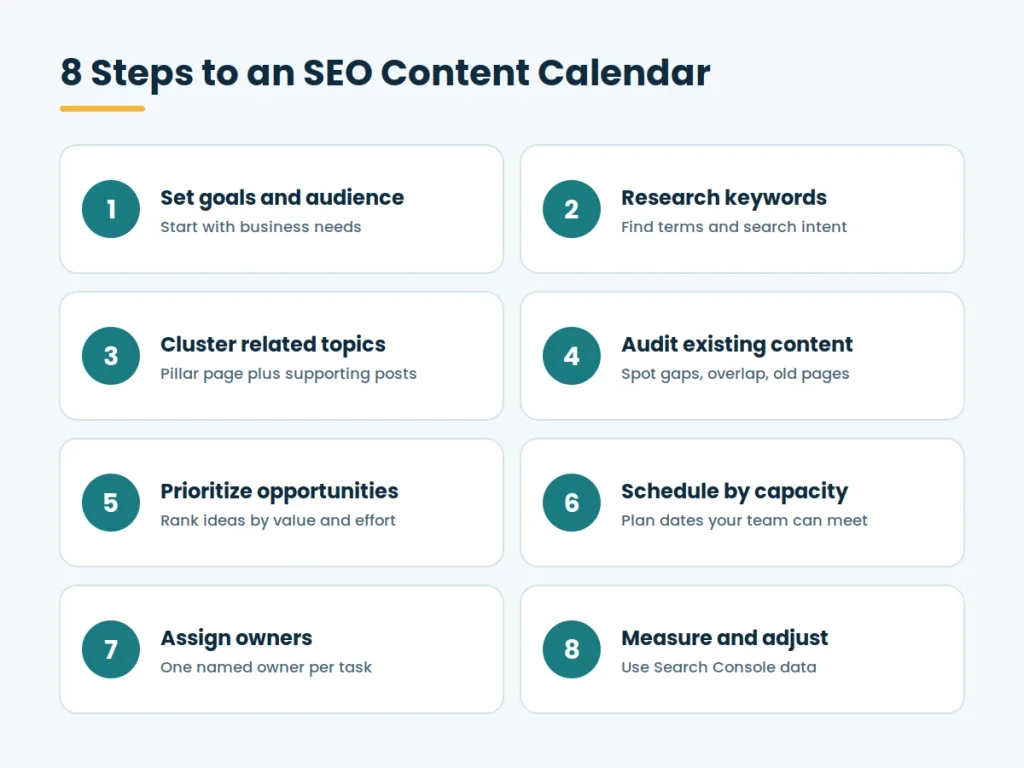
They start with business goals and audience needs, then research the keywords and questions their audience searches for, group related topics together, review what already exists on the site, rank the opportunities, set realistic publication dates, assign an owner to each task, and check search performance to adjust the plan.
In short:
Research goals and audience → Research keywords → Group topics → Audit existing content → Prioritize opportunities → Schedule publication → Assign owners → Measure results
What Is an SEO Content Calendar?
An SEO content calendar is a schedule of planned website content built around search demand. Each entry usually records the topic, the target keyword, the search intent behind it, the content type, the owner, the deadline, the publication date, and the current status. Many teams also track the target URL, internal links to add, and a review date after publication.
It is easy to confuse with related documents:
Content strategy:
The long-term plan covering goals, audiences, themes, and how content supports the business. The calendar puts that strategy into a schedule.
Content brief:
A document for one piece of content, covering its angle, outline, keywords, sources, and requirements. A calendar entry often links to a brief.
Social media calendar:
A schedule of posts on social platforms. An SEO calendar focuses on pages that can appear in search results, such as articles, guides, product pages, and landing pages. The two can be coordinated, but they answer different questions.
Why Do Companies Use Content Calendars for SEO?
A calendar gives SEO work structure. The practical benefits include:
- Organization: Topics, keywords, and deadlines sit in one place instead of scattered across emails and chats.
- Consistent workflows: Research, drafting, editing, review, and publishing follow the same steps each time.
- Fewer duplicate topics: Seeing every planned and published page makes it easier to spot overlap before it happens.
- Seasonal planning: Content for predictable demand peaks can be started early enough to be ready on time.
- Team coordination: Writers, editors, designers, and SEO specialists can see dependencies and deadlines.
- Scheduled updates: Existing pages that need refreshing get time in the plan rather than being forgotten.
How Do Companies Create an SEO Content Calendar?
1. Define Business Goals and the Target Audience
Content planning starts with what the business needs and who it is trying to reach. A goal might be more qualified leads, more product trials, better support self-service, or stronger awareness in a new market. Each goal suggests different content.
Audience research matters just as much. Companies look at customer questions, sales conversations, support tickets, and survey responses to understand what people want to know at each stage of their decision. These inputs shape which topics deserve a place in the calendar.
2. Research Keywords and Search Intent
Keyword research identifies the words and phrases people use. Teams typically collect:
- Primary keywords: The main phrase a page is meant to address.
- Secondary keywords: Closely related terms the same page can cover naturally.
- Long-tail queries: Longer, more specific searches that often reveal clearer needs.
- Related searches: Questions and variations visible in search results, such as related questions and suggested searches.
Search intent is the reason behind a query. Someone searching for a definition wants an explanation, while someone comparing products wants evaluation. Checking the current search results for a keyword shows which formats and angles searchers appear to expect.
Search volume alone should not decide the topic. A high-volume keyword may be too competitive, poorly matched to the business, or tied to an intent the company cannot serve. A lower-volume query with a clear need and strong relevance can be the better choice. Google Search Console adds a useful angle by showing the queries that already bring impressions and clicks to a site.
3. Organize Topics Into Content Clusters
Rather than listing disconnected articles, many companies group topics into clusters. A cluster usually has a broad pillar page that covers a subject overview, supported by narrower articles on specific questions. For example, a pillar on email marketing could connect to articles on segmentation, automation, and campaign metrics.
Clusters help teams see coverage gaps and plan internal links between related pages. Google’s documentation notes that links help it discover pages and understand how they relate, and that descriptive anchor text is useful to readers and search engines. Good linking supports navigation and clarity, but it does not guarantee any ranking improvement.
4. Audit Existing Content
Before adding new pages, companies review what they already have. An audit usually looks for:
Outdated pages:
Information, screenshots, or examples that are no longer accurate.
Overlapping topics:
Several pages targeting the same query and intent, which may be candidates for consolidation.
Content gaps:
Questions in a cluster that no page answers.
Internal linking opportunities:
Relevant pages that should link to each other but do not.
Underperforming pages:
Pages with impressions but few clicks, or pages that no longer match current intent.
5. Prioritize Content Opportunities
Not every idea can be produced at once, so teams rank them. Common criteria include:
- Relevance to the business and its goals
- Audience need and search intent match
- Level of competition in search results
- Potential value, such as the likelihood of leading to a lead, sale, or sign-up
- Available expertise inside or outside the team
- Production effort, including research, design, and review
- Seasonal timing
6. Create a Realistic Publishing Schedule
So, how do companies create a content calendar for SEO without overcommitting? They start from capacity. Publication dates should reflect how many pieces the team can research, write, review, and publish well, along with the complexity of each piece, how long subject-matter experts need to respond, editorial and legal review time, and any fixed deadlines such as product launches or seasonal peaks.
Work backward from the publication date to set deadlines for the brief, first draft, review, revisions, and final approval. There is no single correct publishing frequency. A small team publishing two strong articles a month may serve its audience better than one rushing out weekly posts of uneven quality. Leave buffer time for delays and for updates to existing content.
7. Assign Responsibilities and Track Progress
Every calendar entry needs a named owner and a deadline for each stage. Typical roles include:
- Writers: Draft the content.
- Editors: Review clarity, accuracy, and style.
- SEO specialists: Provide keyword and intent guidance and check on-page elements.
- Subject-matter experts: Supply or verify specialist information.
- Designers: Create images, charts, or layouts.
- Publishers: Upload, format, and schedule the page in the content management system.
8. Plan Internal Links and Content Updates
Plan links at the same time as the content. For each new page, note which existing pages should link to it and which pages it should link to, using descriptive anchor text. This avoids the common situation where a new article is published but nothing points to it.
Also schedule updates. Some pages need a regular accuracy check, such as pricing, regulations, statistics, or product features. Others should be updated when performance data shows a decline or when search results show that intent has shifted. Treat updates as calendar entries with owners and dates, the same as new content.
9. Measure Results and Improve the Calendar
Measurement closes the loop. Google Search Console’s performance reporting shows clicks, impressions, average position, and the queries and pages involved. Combined with analytics, teams can review:
- Organic clicks and impressions
- Search queries that bring traffic to each page
- Organic landing-page traffic
- Conversions connected to those pages, such as sign-ups or inquiries
- Progress on planned content updates
What Should an SEO Content Calendar Include?
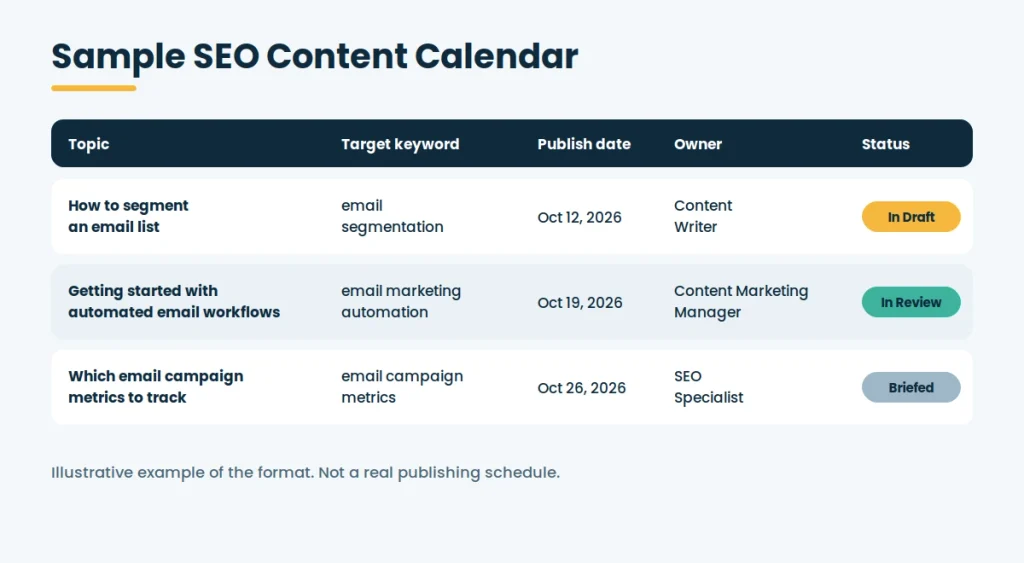
At a minimum, each row should show the topic, target keyword, search intent, content type, publication date, and status. The sample below also includes an owner, and teams often add the target URL, internal links, and a review date.
The schedule below is illustrative. It is an example of the format and does not represent any real company’s publishing history. The owners are role-based examples, not real people.
| Topic | Target Keyword | Search Intent | Content Type | Publication Date | Owner | Status |
| How to segment an email list | email segmentation | Informational | How-to guide | October 12, 2026 | Content Writer | In Draft |
| Getting started with automated email workflows | email marketing automation | Informational | Pillar guide | October 19, 2026 | Content Marketing Manager | In Review |
| Which email campaign metrics to track | email campaign metrics | Informational | Explainer article | October 26, 2026 | SEO Specialist | Briefed |
Which Tools Can Companies Use to Manage an SEO Content Calendar?
The best tool is the one the team will actually keep up to date. Common options include:
Google Sheets or Microsoft Excel:
Flexible, familiar, and low cost. They suit small teams and work well for sorting, filtering, and scoring ideas, though they need discipline as the calendar grows.
Project management tools:
Task boards and timelines help with assignments, deadlines, dependencies, and status changes across several contributors.
Notion:
A workspace that can combine databases, calendar views, briefs, and documentation in one place.
Content management systems:
Many let teams draft, schedule, and publish pages, and some offer editorial calendars or plugins for them. This keeps the plan close to the publishing step.
Google Search Console:
A free Google tool that shows how a site performs in Google Search, including queries, pages, clicks, and impressions. It is useful for finding opportunities and for measuring results.
SEO research platforms:
Paid platforms can help with keyword research, competitor analysis, and content audits at scale.
Paid tools are not essential for every company. A small business can build a workable process with a spreadsheet and Search Console. Check each tool’s current official documentation for features and limits before committing, since these change over time.
Common SEO Content Calendar Mistakes to Avoid
- Choosing topics by search volume alone: Volume ignores relevance, competition, and business value.
- Ignoring search intent: A page that does not match what searchers want is unlikely to serve them well.
- Creating overlapping articles: Multiple pages on the same query can confuse readers and split effort.
- Planning beyond capacity: An overloaded calendar leads to rushed work and missed dates.
- Neglecting existing content: Outdated pages can undermine trust and waste potential.
- Leaving tasks without owners: Unassigned work tends to stall.
- Forgetting internal links: New pages that nothing links to are harder for readers and crawlers to find.
- Measuring output instead of results: Counting published posts says little about whether content helped the audience or the business.
How Often Should Companies Update Their SEO Content Calendar?
Most teams review the calendar on a regular rhythm, such as a short check each week or two for task status and a deeper monthly or quarterly review for priorities. The right cadence depends on team size, publishing volume, and how fast the industry changes. Also revisit it when something significant happens, such as a product launch, a shift in search results, or a change in business goals.
Reviewing the plan is different from updating a published article. A calendar review asks whether the schedule, priorities, and assignments still make sense. An article update changes the content of a specific page, such as correcting information, adding sections, or improving internal links. A calendar review often produces article updates as new entries, but they are separate tasks.
FAQs
What is an SEO content calendar?
It is a schedule of planned website content organized around search demand. It tracks topics, keywords, intent, owners, deadlines, publication dates, and status.
How do companies create a content calendar for SEO?
They set goals, research keywords and intent, group topics into clusters, audit existing pages, prioritize ideas, schedule work based on capacity, assign owners, plan links and updates, and review performance data to refine the plan.
What should an SEO content calendar include?
At minimum: topic, target keyword, search intent, content type, publication date, and status. Owner, target URL, internal links, and review dates are common additions.
How far in advance should a content calendar be planned?
There is no fixed rule. Many teams plan detailed work a month or a quarter ahead and keep a looser list of later ideas. Seasonal topics may need earlier planning, and a shorter window is easier to adjust.
Which tools can be used to create an SEO content calendar?
Spreadsheets, project management tools, Notion, and content management systems can hold the calendar. Google Search Console and SEO research platforms inform and measure it. A simple setup is often enough.
How often should an SEO content calendar be updated?
Review task status frequently and priorities on a monthly or quarterly basis, plus whenever business goals or search conditions change.
Does publishing consistently improve SEO rankings?
Not by itself. A regular schedule helps a team deliver useful, well-planned content reliably, but Google does not rank pages higher simply because they are published on a set frequency. Quality, relevance, and usefulness to searchers are what matter.